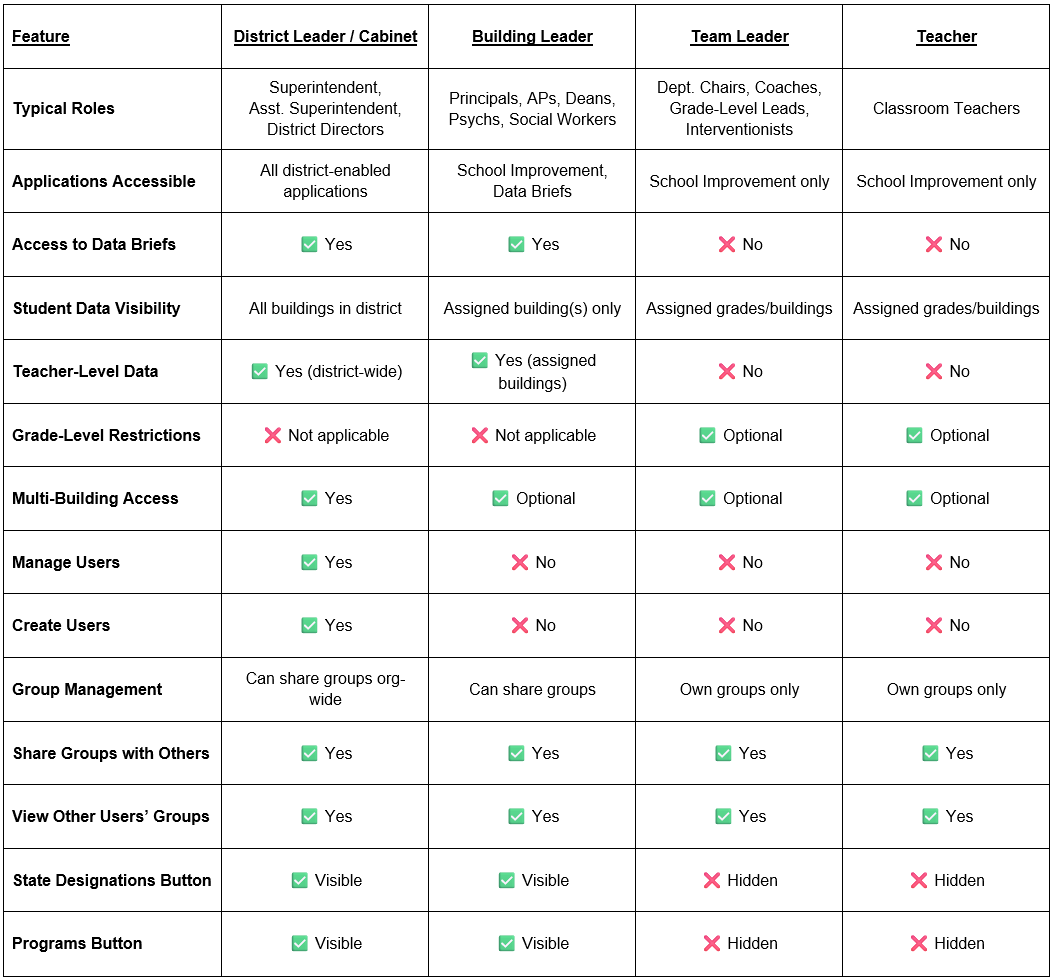
This guide provides a general overview of each user role and the default permissions associated with each role. Your district can request different permissions for specific roles.
To access your ECRA platform, a user must be assigned a role and granted permission to view data for a specific building, grade level, or for the entire district. Users can be assigned multiple roles and can switch their portal view between their assigned roles by clicking their initial in the top right corner of the ECRA platform and selecting Switch Profile.
District Leaders
Typical Roles
Superintendent, Assistant Superintendent, District Directors, Cabinet-Level Leaders
Application Access
– Access to all applications enabled for the district
Data Visibility
– Can view students, teachers, and data briefs for all buildings in the district
User Management
– Can manage users via the gear icon in the top-right corner of the platform
Group Management
– Can share groups throughout the organization
Restrictions
– None specific to application access
Building Leaders
Typical Roles
Principals, Assistant Principals, Deans, School Psychologists, School Social Workers, or other multi-grade leaders
Application Access
– Access to School Improvement and Data Brief applications
Data Visibility
– Can view students, teachers, and data briefs for assigned building(s)
– May be permissioned to view multiple buildings
User Management
– Cannot create or manage users
Group Management
– Can share groups with other users
Restrictions
– Access limited to specific building(s), not the full district
Team Leaders
Typical Roles
Department Chairs, Instructional Coaches, Grade-Level Leaders, Interventionists
Application Access
– Access to the School Improvement application only
– Does not have access to Data Briefs
Data Visibility
– Can be restricted to specific grades
– Sees all assigned grades by default
– May be permissioned to view multiple buildings
User Management
– Cannot create or manage users
Group Management
– Can view and manage only groups they personally create
– Can share groups with other users
Restrictions
Cannot view the following buttons:
– State Designations
– Programs
Teachers
Typical Roles
Classroom Teachers
Application Access
– Access to the School Improvement application only
– Does not have access to Data Briefs
Data Visibility
– Can be restricted to specific grades
– Sees all assigned grades by default
– May be permissioned to view multiple buildings
User Management
– Cannot create or manage users
Group Management
– Can view and manage only groups they personally create
– Can share groups with other users
Restrictions
Cannot view the following buttons:
– Buildings
– Grades
– State Designations
– Programs
User Roles and Access Levels – At-a-Glance Comparison